Call Tracking Team Management with Roles, Permissions and Multi-Business
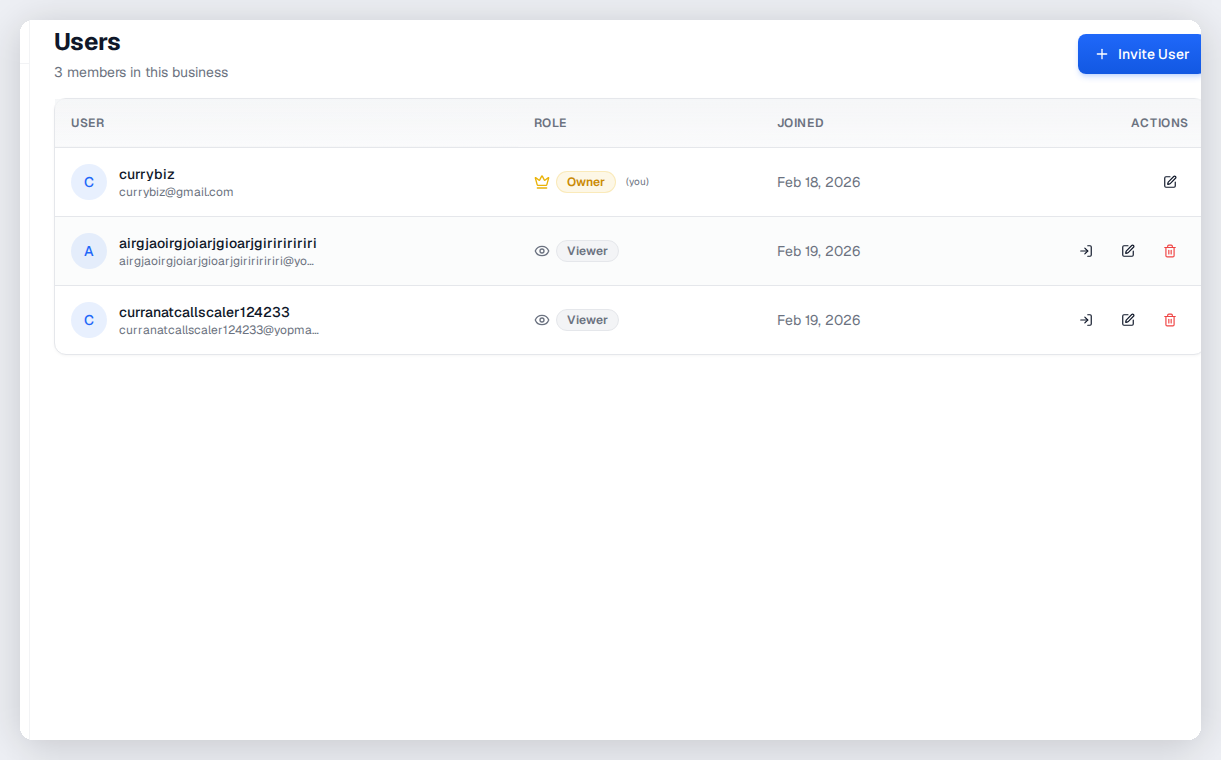
Manage your team with role-based permissions. Owner, admin, member, and viewer roles control who can manage numbers, view recordings, access billing, or just see reports. Unlimited businesses on Agency+ plans.
The bottom line
Last updated: February 2026CallScaler's team management supports four permission levels (owner, admin, member, viewer) with granular control over who can manage numbers, view recordings, access billing, or just see reports. Multi-business workspaces let you organize by client, brand, or project, with unlimited workspaces on Agency and Network plans. Activity audit logging tracks who changed what and when. This is comparable to team features in CallRail and CallTrackingMetrics but included at no extra per-seat cost.
How it works
Roles, permissions, and multi-business access for growing teams.
Invite Team Members
Send email invitations to your team. They create their account and join your workspace.
Assign Roles
Set each member as owner, admin, member, or viewer. Each role has different permission levels.
Organize by Business
Create separate business workspaces. Assign team members to specific businesses.
Manage at Scale
Add or remove members, change roles, and manage access across all your businesses from one account.
Key capabilities
Control who sees what across every business and workspace.
Role-Based Access Control
Four permission levels: owner, admin, member, viewer. Granular control over every action.
Multi-Business
Create separate workspaces for each client, brand, or project. Unlimited on Agency+ plans.
Permission Boundaries
Members see only what their role allows. Billing, recordings, and admin actions are restricted.
Team Invitations
Invite by email. New members get guided onboarding for their permission level.
Activity Audit
See who did what and when. Track changes to numbers, call flows, and settings.
SSO Ready
Enterprise SSO integration available for teams that require centralized authentication.
Try Team Management free
No credit card required. Set up in under 60 seconds.
Who uses team management?
Any organization with multiple people who need access to call tracking data.
Understanding roles and permissions
CallScaler has four permission levels. Owners have full access including billing and account deletion. Admins can manage everything except billing, making them ideal for operations managers. Members can work with tracking numbers, call flows, and call data but cannot change team settings or invite others. Viewers have read-only access to call data and reports, perfect for clients or stakeholders who just need visibility. Each role is designed for a specific use case so you do not have to create custom permission sets.
Multi-business workspace organization
Organize your account by business, client, or project:
- Create separate workspaces for each client with isolated data and tracking numbers
- Assign team members to specific businesses so they only see relevant data
- Switch between businesses from a single login without signing in and out
- Agency and Network plans include unlimited business workspaces at no extra cost
- Each workspace has its own tracking numbers, call flows, analytics, and settings
- Aggregate views let admins see data across all businesses when needed
Inviting and managing team members
Invite team members by email directly from the dashboard. New members receive a guided onboarding flow tailored to their permission level, so a viewer sees different setup guidance than an admin. You can change roles at any time, remove members instantly, and see which team members are active. For agencies with client turnover, adding and removing access as clients onboard and offboard is quick and does not require support tickets or waiting periods.
Activity audit for accountability
Track every significant action across your account:
- See who created, modified, or deleted tracking numbers and call flows
- Track permission changes including role upgrades and team member additions
- Monitor settings changes for billing, integrations, and account configuration
- Use audit data for compliance requirements in regulated industries
- Identify who made a specific change when troubleshooting unexpected behavior
Scaling team access as your business grows
CallScaler does not charge per seat, so you can invite your entire team without worrying about per-user costs adding up. This is a meaningful difference from competitors like CallRail and CallTrackingMetrics that charge per additional user. As your agency grows from 5 to 50 team members, your CallScaler cost stays the same. Combine team management with client portals and white labeling to build a complete multi-tenant platform where your team, your clients, and their teams all have appropriate access levels.
Common team structures for agencies
Organize your agency team with these typical permission setups:
- Agency owner: Owner role with full access including billing and account settings
- Account managers: Admin role to manage client businesses and call flows
- Analysts: Member role to access call data and generate reports without admin access
- Client contacts: Viewer role for read-only access to their own business data
Team management for pay-per-call networks
Pay-per-call networks often have separate teams for sales, operations, and finance. Give your sales team access to manage buyers and publishers. Operations gets access to call flows and routing configuration. Finance gets reporting and export access for billing reconciliation. The four-role system maps cleanly to these team structures without requiring custom permission sets.
Onboarding new team members
Get new hires productive quickly with these practices:
- Invite team members with the appropriate role from day one — do not over-permission
- New members get guided onboarding tailored to their permission level
- Use the activity audit to verify new team members are making appropriate changes
- Review team permissions quarterly to remove inactive members and adjust roles as needed
Frequently asked questions
Common questions about Team Management.
Related features
Works great with Team Management.
Client Portals
Create branded portals for each client with customizable permissions. Clients see their calls, recordings, and reports — nothing else. Build trust and reduce support requests.
Learn moreWhite Labeling
Run CallScaler under your own brand with a custom domain, your logo, and your colors. Your clients never see CallScaler.
Learn moreCall Log
A comprehensive log of every call with recording, transcript, AI summary, lead score, source data, and caller information. Filter, search, export, and take action on any call in seconds.
Learn moreReady to try Team Management?
Sign up free and get started in under 60 seconds. No credit card required.