AI Lead Scoring for Call Tracking That Rates Every Call 0 to 100
AI listens to every call and assigns a lead score from 0 to 100 based on the conversation. Filter your call log by score, send high-value leads to your CRM, and focus your team on the opportunities that matter.
The bottom line
Last updated: February 2026CallScaler's AI lead scoring analyzes every call transcript and assigns a score from 0 to 100 based on buyer intent signals like budget mentions, timeline urgency, and decision-maker presence. Scores of 80+ indicate hot leads, 50 to 79 are warm, and below 50 is informational or spam. Scores can be pushed to your CRM via webhook and used to filter your call log. This feature is included on all plans, unlike competitors that gate AI scoring behind enterprise tiers.
How it works
AI evaluates buyer intent signals and scores every call.
Call Transcribed
After the call ends, AI generates a full transcript with speaker labels and conversation analysis.
AI Evaluates
The model analyzes buyer intent signals: budget mentions, timeline urgency, decision-maker presence, and specificity of request.
Score Assigned
A score from 0–100 is assigned. 80+ is a hot lead. 50–79 is warm. Below 50 is informational or spam.
Act on Scores
Filter your dashboard by score. Route high-scoring leads to top closers. Push scores to your CRM via webhook.
Key capabilities
Focus your team on leads that are ready to buy.
0–100 Lead Score
Every call scored on a 100-point scale. Consistent, objective, and instant.
Conversation Analysis
AI evaluates intent signals, not just keywords. Understands context and nuance.
Score-Based Filtering
Filter your call log by lead score. See only hot leads, or review cold calls for training.
CRM Integration
Push lead scores to your CRM via webhook. Auto-create high-priority leads for your sales team.
Score Trends
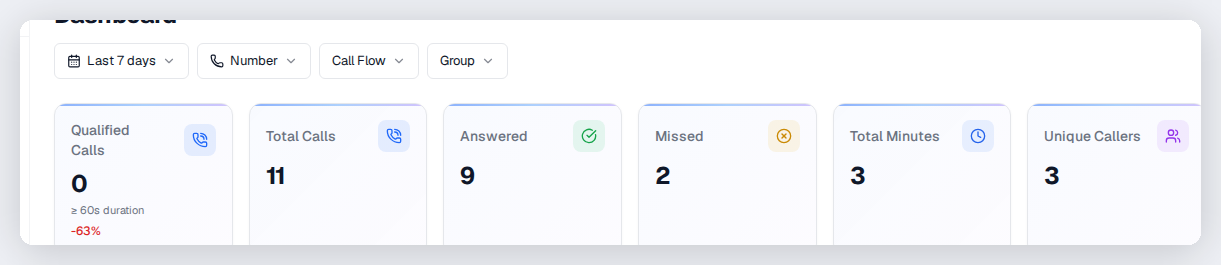
Track average lead score over time by source, campaign, and keyword. Optimize for quality, not just volume.
Custom Thresholds
Define what 'qualified' means for your business. Set thresholds for notifications and routing.
Try Lead Scoring free
No credit card required. Set up in under 60 seconds.
Who uses lead scoring?
Sales teams and lead gen companies that need to prioritize the best calls.
How AI lead scoring evaluates calls
CallScaler's lead scoring model analyzes the full conversation transcript, not just keywords. It looks for buyer intent signals like budget mentions ('we have $10K set aside for this project'), timeline urgency ('we need this done before next month'), decision-maker language ('I am the homeowner' vs 'I am just getting information for my boss'), and specificity of request ('we need a 30-square roof replacement' vs 'how much does roofing cost'). These signals are weighted and combined into a single 0 to 100 score.
Understanding score ranges
Here is what the lead score ranges typically indicate:
- 80 to 100: Hot lead with strong buying signals, ready to book or purchase
- 60 to 79: Warm lead actively shopping but may need follow-up or nurturing
- 40 to 59: Informational inquiry, early-stage research, or comparison shopping
- 20 to 39: Low intent, wrong number, or general questions not related to purchasing
- 0 to 19: Spam, robocall, or completely unqualified call
- Scores are consistent across calls so you can compare leads reliably over time
Using lead scores to optimize ad campaigns
The most powerful use of lead scoring is feeding quality data back to your ad platforms. Instead of telling Google Ads that every phone call is a conversion, you can set a threshold (say, lead score 70 or above) and only report qualified calls as conversions. This teaches Smart Bidding to optimize for keywords and audiences that generate high-quality phone leads, not just any phone call. Over time, your cost per qualified lead drops because the algorithm learns what a good lead looks like.
Lead score filtering and routing
Put lead scores to work in your daily operations:
- Filter the call log by score range to quickly find hot leads needing immediate follow-up
- Set up webhook notifications that fire only when a call scores above your threshold
- Route high-scoring leads to your best closers using call flow priority rules
- Compare average lead scores across campaigns to measure lead quality by source
- Track score trends over time to spot campaigns that are attracting lower-quality traffic
Customizing lead scoring for your business
Different businesses have different definitions of a qualified lead. A roofing company might consider any homeowner with a timeline as qualified, while a law firm needs someone with a specific legal situation and geographic jurisdiction. CallScaler's scoring model adapts to common business verticals automatically, but you can set custom thresholds for what counts as qualified in your reporting and conversion rules. This flexibility lets you use the same scoring system whether you run a plumbing company or a national pay-per-call network.
Lead scoring for pay-per-call billing
Pay-per-call networks use lead scores to determine billing. Instead of billing on raw call duration, set a lead score threshold that defines a 'qualified' call. Calls scoring above the threshold are billable; calls below it are not. This protects buyers from paying for spam or unqualified calls and gives publishers an incentive to send quality traffic.
Comparing lead scores across campaigns
Use lead score data to optimize your marketing spend:
- Sort campaigns by average lead score to find which sources send the best traffic
- Identify campaigns with high call volume but low lead scores — these waste budget
- Track lead score trends over time to spot declining traffic quality early
- Compare lead scores across ad platforms to decide where to allocate more spend
Automating actions based on lead scores
Trigger workflows automatically when calls hit score thresholds:
- Send webhook notifications only for calls scoring above 70 to reduce noise
- Create CRM leads automatically only for qualified calls via Zapier
- Push high-scoring calls as conversions to Google Ads and Meta for smarter bidding
- Alert managers via Slack when a call scores above 90 for immediate follow-up
Frequently asked questions
Common questions about Lead Scoring.
Related features
Works great with Lead Scoring.
AI Call Summaries
AI reads every call transcript and generates a concise summary: who called, what they wanted, and whether they're a qualified lead. Built for best-in-class accuracy on phone conversations.
Learn moreAnalytics Dashboard
See call volume, source attribution, lead quality trends, and conversion data — all in real time. Custom date ranges, filters, and breakdowns help you make faster, smarter marketing decisions.
Learn moreGoogle Ads Integration
Close the attribution loop. When a Google Ads click turns into a phone call, CallScaler sends the conversion back to Google Ads — including gclid, call duration, and lead score. Your Smart Bidding gets smarter.
Learn moreReady to try Lead Scoring?
Sign up free and get started in under 60 seconds. No credit card required.