Call Tracking Voicemail with Auto-Transcription and Alerts
Capture voicemails with automatic transcription when no one picks up. Get instant notifications via email or webhook so your team can follow up in minutes, not hours.
The bottom line
Last updated: February 2026CallScaler's voicemail system captures messages when calls go unanswered, automatically transcribes them, and sends instant notifications via email or webhook with the transcription and caller details. You can set custom greetings per number or call flow using text-to-speech or uploaded audio. Voicemail is included on all plans. Compared to standalone voicemail services, CallScaler integrates voicemail directly into your call tracking workflow with source attribution and AI analysis.
How it works
Capture and transcribe every message when no one picks up.
Configure Voicemail
Set up voicemail as a fallback in your call flow or on any tracking number. Record a custom greeting or use text-to-speech.
Caller Leaves Message
When no one answers after your configured timeout, the caller hears your greeting and leaves a message.
Instant Transcription
CallScaler transcribes the voicemail automatically. Read the message without listening to audio.
Get Notified
Receive email notifications or webhook events with the transcription, caller ID, and source data.
Key capabilities
Never lose a lead to a missed call again.
Custom Greetings
Record your own greeting or type a message for text-to-speech. Different greetings per number or call flow.
Auto-Transcription
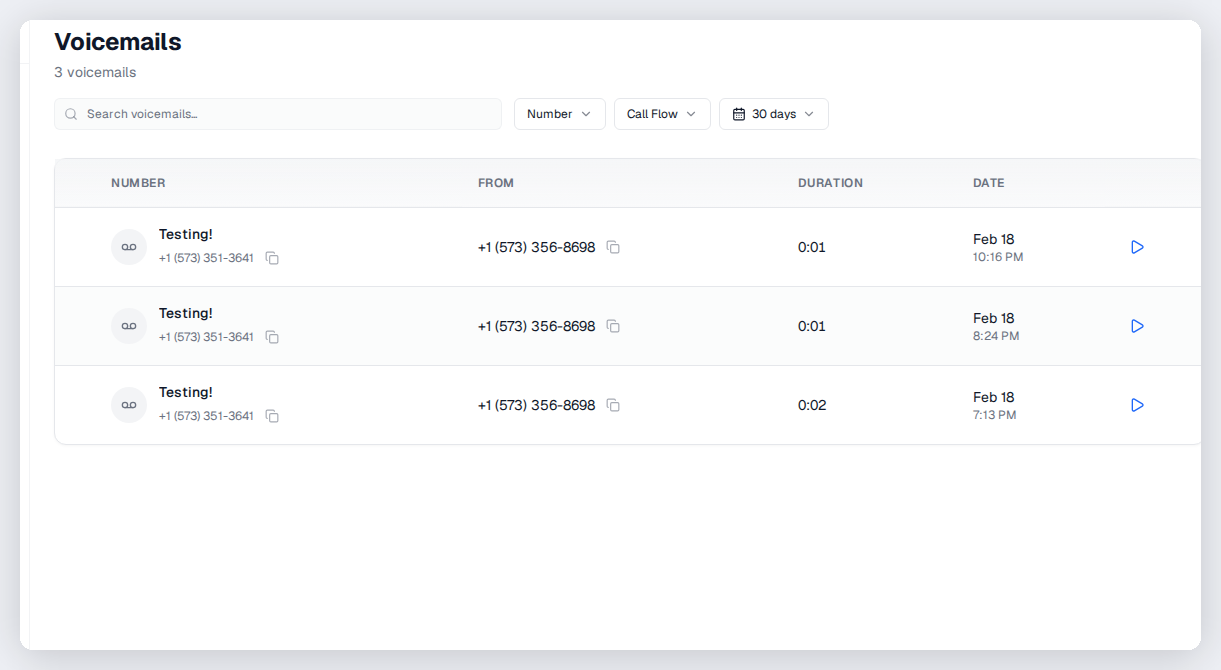
Every voicemail is transcribed automatically. Read messages at a glance in your dashboard.
Instant Notifications
Email alerts with transcription and caller details. Webhook events for CRM integration.
Configurable Timeout
Set how long to ring before going to voicemail. Different timeouts for different routes.
Click-to-Callback
One click from the voicemail notification to call the person back.
Voicemail Analytics
Track voicemail volume, response times, and callback rates.
Try Voicemails free
No credit card required. Set up in under 60 seconds.
Who uses voicemails?
Any business that receives calls outside of hours or when the team is busy.
Why voicemail matters for lead generation
Every missed call is a potential lost lead. Voicemail captures that opportunity even when nobody is available to answer. CallScaler's voicemail system automatically transcribes messages so your team can read them at a glance and prioritize callbacks. Instant email and webhook notifications mean you can respond within minutes instead of hours. For businesses that cannot staff phones around the clock, voicemail is the safety net that keeps leads from slipping through the cracks.
Setting up voicemail in your call flow
Add voicemail as a fallback node in any call flow. The typical pattern is: ring the primary destination for 20 to 30 seconds, then route to voicemail if nobody answers. You can record a custom greeting or type a message for text-to-speech. Different call flow branches can have different greetings. For example, your sales line might say 'Leave your name and number and we will call you right back' while your support line says 'Our team is currently unavailable, please leave a detailed message.'
Voicemail notifications and follow-up
Get notified instantly when voicemails come in:
- Email notifications include the transcription, caller ID, source attribution, and a link to the audio
- Webhook events push voicemail data to your CRM for automated follow-up workflows
- The CallScaler dashboard shows all voicemails with transcriptions you can scan quickly
- Click-to-callback lets you return the call directly from the notification or dashboard
- Filter voicemails by source to see which campaigns generate the most missed calls
Voicemail analytics and optimization
Track voicemail volume to understand when your team misses the most calls. If voicemails spike on Tuesday afternoons, you might need more coverage during that window. Compare voicemail rates across tracking numbers to see if certain campaigns or sources generate calls at times when your team is unavailable. High voicemail rates on specific numbers might mean the call flow timeout is too short or the destination is consistently busy. Use this data to adjust staffing and call routing.
Best practices for voicemail greetings
Create greetings that maximize callback success:
- Keep greetings under 15 seconds so callers do not hang up before the beep
- Ask for the caller's name, number, and a brief description of what they need
- Mention when they can expect a callback to set expectations
- Use a professional but friendly tone that matches your brand voice
- Update greetings for holidays or schedule changes so callers know what to expect
Voicemail as a lead capture safety net
Think of voicemail as your last chance to capture a lead before they call a competitor. A well-crafted greeting reassures callers that their message matters and sets a callback expectation. Combined with instant notifications, your team can return calls within minutes. Businesses that respond to voicemails within 5 minutes convert at significantly higher rates than those that wait hours.
Voicemail with call flow integration
Use voicemail strategically within your call flows:
- Add voicemail as a fallback after round-robin exhausts all available agents
- Set different ring timeouts per destination before falling back to voicemail
- Use different greetings for different call flow branches (sales vs support)
- Route voicemail notifications to specific team members based on the call flow path
Reducing voicemail rates over time
High voicemail rates mean missed revenue. Review your voicemail analytics to identify patterns. If most voicemails come during specific hours, adjust staffing or add after-hours routing. If certain tracking numbers have unusually high voicemail rates, check that the destination numbers are correct and the ring timeout is not too short. Use call flow schedule routing to redirect calls to available team members instead of letting them go to voicemail.
Frequently asked questions
Common questions about Voicemails.
Related features
Works great with Voicemails.
Call Flows
Build sophisticated call routing with zero code. Greetings, IVR menus, round-robin distribution, schedule-based routing, geo-routing, and webhooks — all in a visual editor that anyone can use.
Learn moreCall Recording
Automatically record inbound and outbound calls. Play back recordings from the dashboard, download for compliance, and use AI to transcribe and summarize every conversation.
Learn moreCall Whisper
A short whisper message plays to the person answering the call — before the caller is connected. Know which campaign, source, or offer is calling so you can tailor your greeting and close more deals.
Learn moreReady to try Voicemails?
Sign up free and get started in under 60 seconds. No credit card required.